
← Help Center

Connect a TikTok account

Connect a social account you are authorized to manage, so AI-SocialLink can publish to it and show its data.

Steps

  1. Verify your email

    After you create an account we email you a verification link. Open it once; connecting a TikTok account requires a verified email.

  2. Open Account center → Social accounts

    Open the account menu, choose Account center, and stay on the Social accounts tab. Select “Add a social account”.

  3. Choose TikTok and select Connect

    In the “Connect a social account” dialog, choose the platform tab and select Connect. You will be redirected to the platform.

  4. Authorize on TikTok

    Sign in on TikTok if asked, check which account you are authorizing, and approve the permissions below. We request only these, and use each only for the purpose listed.

    • user.info.basic Identify the connected account (open ID, display name, avatar).
    • user.info.profile Show profile details such as username, bio link and verification status.
    • user.info.stats Show follower, following, likes and video counts.
    • video.list List the account’s public videos and their statistics in Content & insights.
    • video.publish Publish a video you submit directly to your account.
    • video.upload Send a video to your TikTok inbox as a draft so you can finish editing it in TikTok.
  5. Return to AI-SocialLink

    You come back to Social accounts with the message “TikTok account connected.” The account card shows the profile and statistics; use Refresh profile to update them.
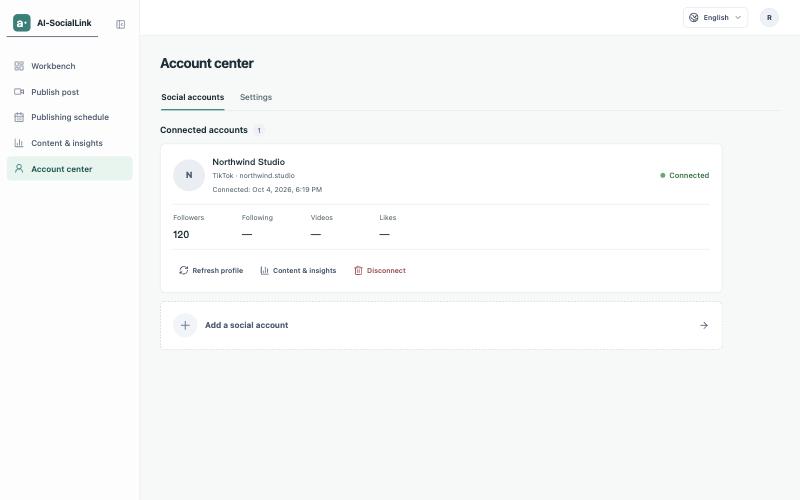
    Account center on the Social accounts tab, showing the connected TikTok account Northwind Studio with its follower count, Refresh profile, Content & insights and Disconnect buttons, and an Add a social account row below it.